
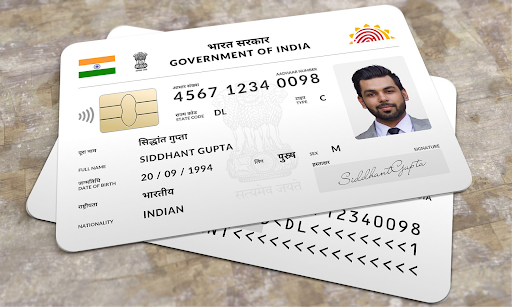
The Aadhaar card, issued by the Unique Identification Authority of India (UIDAI), is one of the most vital identification documents in India. It serves as proof of identity and address and is required for a variety of services, including opening bank accounts, applying for government schemes, and even accessing a loan through a personal loan app. However, what happens if you lose your Aadhaar card? Losing your Aadhaar can be worrisome, but rest assured, reapplying or reissuing it is a straightforward process. In this article, we’ll walk you through the steps on how to apply for Aadhaar card if lost and highlight the reissue process to help you navigate this situation effectively.
What Should You Do If You Lose Your Aadhaar Card?
Before diving into the reissue process, it is important to understand what you should do if you lose your Aadhaar card. The first and foremost step is not to panic. Even if your physical copy is lost, your Aadhaar identification details stay intact in the UIDAI database. Additionally, you can easily retrieve the card’s details online. The UIDAI has streamlined the process so citizens can access duplicate Aadhaar cards or order new copies with minimal effort.
How to Apply for Aadhaar Card If Lost
If you’ve lost your Aadhaar card, don’t worry. You can retrieve it by following these methods, which explain how to apply for aadhaar card if lost step by step.
Step 1: Retrieve Your Aadhaar Details Online
If you’ve misplaced your Aadhaar card but remember your Aadhaar number or the Enrollment ID (EID) mentioned during the application process, you can download an electronic version of the card called e-Aadhaar. Here’s how to do it:
- Visit UIDAI’s Official Website: Go to www.uidai.gov.in.
- Click on “Download Aadhaar”: This option is available under the “My Aadhaar” section.
- Enter Aadhaar Information: Enter your Aadhaar number (if known) or your EID.
- Verify via OTP: Provide your registered mobile number to receive a One-Time Password (OTP). Enter the OTP to verify your identity.
- Download e-Aadhaar: Once verified, you can download the e-Aadhaar and print it for your use. e-Aadhaar is equally valid as the physical copy.
Step 2: Request a Reprint of Aadhaar Card
UIDAI offers the “Order Aadhaar Reprint” service, which allows you to order a reprinted copy of your Aadhaar card. Follow these steps:
- Visit UIDAI Portal: Go to UIDAI’s official website.
- Click on “Order Aadhaar Reprint”: You can find this option under the “My Aadhaar” section.
- Provide Your Details: Enter your Aadhaar or Virtual Identification Number (VID) and the security code.
- Verify Using OTP: Submit the OTP sent to your registered mobile number.
- Make Payment for Reprint: Pay a nominal fee of INR 50 (as of October 2023) online.
- Confirmation and Delivery: Once payment is successful, you’ll receive an acknowledgment or Service Request Number (SRN). The reprinted Aadhaar card will be delivered to your registered address via India Post.
Lost Mobile Number? Here’s What to Do
If you’ve lost access to your registered mobile number, the process changes slightly:
- Visit an Aadhaar Enrollment Center: Locate your nearest Enrollment Center through the UIDAI website.
- Update Your Mobile Number: Submit a request to update your mobile number by providing biometric verification and identity proof.
- Proceed with Reissue Process: After updating your number, follow the steps above for reissuance of your Aadhaar card.
Using the mAadhaar App
If you prefer a mobile-centric approach, you can use the mAadhaar app to retrieve or reissue your Aadhaar card:
- Download mAadhaar App: The app is available on Google Play Store and Apple App Store.
- Register Your Aadhaar: Use your Aadhaar credentials and registered mobile number to sign in.
- Access e-Aadhaar: View, download, or even share your Aadhaar securely using this app.
Things to Keep in Mind When Reissuing Aadhaar
- Accuracy of Details: Always double-check the details entered, such as your name, Aadhaar number, and mobile number.
- Registered Mobile Number Is a Must: Reissuing Aadhaar online requires your registered mobile number for OTP verification.
- Nominal Fee: The reprint service comes with a small fee of INR 50, but it ensures hassle-free delivery of your Aadhaar card to your doorstep.
- Processing Time: The printed Aadhaar card is typically delivered within 10 to 15 working days after the request is submitted.
Linking Aadhaar with Financial Services
Since Aadhaar is a mandatory document for availing of financial services, including loans and subsidies, ensure it is updated and easily accessible. For instance, if you’re planning to apply for credit through a personal loan app, you’ll be required to submit Aadhaar for verification. Losing your Aadhaar card can temporarily halt such applications, so it’s essential to reissue it without delay.
Why Choose an e-Aadhaar?
The digital version of Aadhaar, or e-Aadhaar, is as valid as the physical card and comes with multiple benefits:
- It is easy to download and store.
- Digital copies are environmentally friendly.
- The QR code ensures authenticity and prevents forgery.
- It can be accessed from anywhere, making it ideal for emergency situations like applying for a personal loan via an app.
Conclusion
Losing an Aadhaar card can be stressful, but understanding the steps to reapply and reissue it can simplify the process. With the efficient services provided by UIDAI, you can retrieve or reprint your Aadhaar card easily through online platforms or Aadhaar Enrollment Centers. Additionally, using resources like mAadhaar ensures you have Aadhaar handy at all times.
Make sure your Aadhaar is up-to-date and accessible to avoid disruptions in important activities like applying for credit on a personal loan app or availing government benefits. By following the guidelines mentioned above, you can ensure a hassle-free reissue process and continue using this crucial identification document without any obstacles. Remember, your Aadhaar card plays a pivotal role in ensuring seamless access to essential services, so keep it safe and secure!